
Small business IT support cost is usually quoted per user, per month. As a general market estimate (not universal pricing), managed IT services tend to fall into three ranges:
- $75 to $100 per user per month for basic or limited managed IT
- $100 to $150 per user per month for comprehensive managed IT
- $150 to $250+ per user per month for environments that need extensive cybersecurity, compliance support, specialized applications or higher service levels
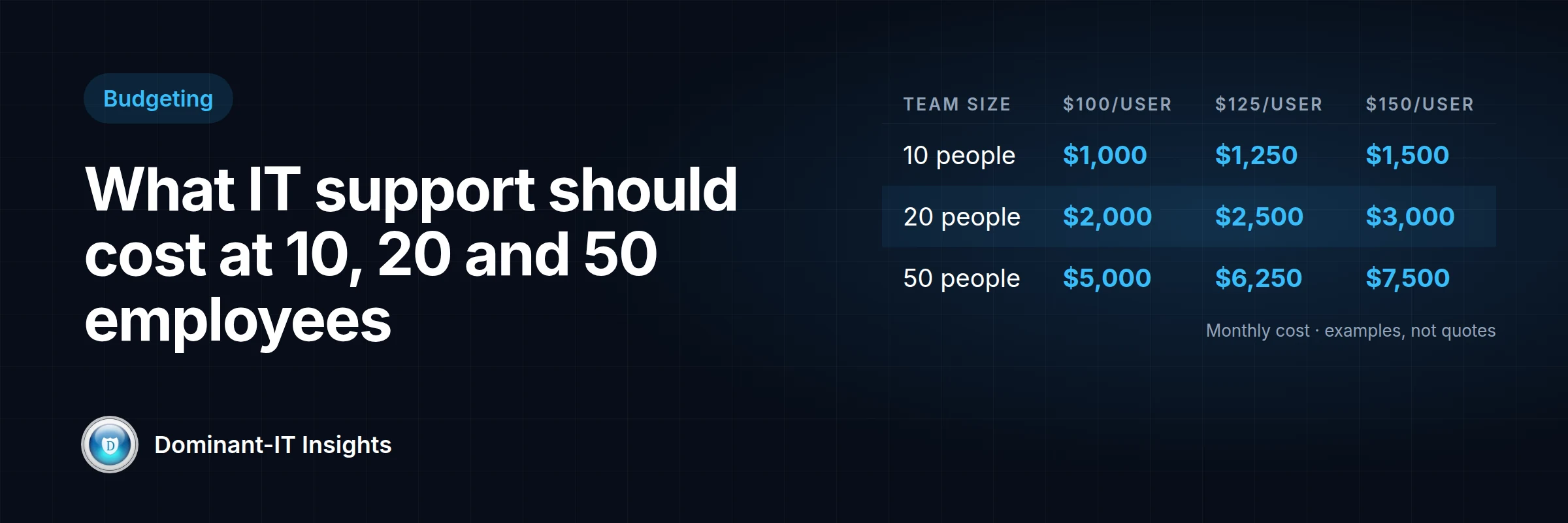
For a 10-person business, that works out to roughly $1,000 to $1,500 a month for comprehensive support. For 50 people, roughly $5,000 to $7,500.
The per-user number only tells you part of the story. A provider charging $75 per user and one charging $150 per user may be selling very different services. The rest of this guide explains what you should expect to get for the money, so you can compare quotes on substance rather than price alone.
How much should a 10-person business spend on IT support?
Example calculations, not quotes:
| Rate | Monthly | Annual |
|---|---|---|
| 10 users × $100 | $1,000 | $12,000 |
| 10 users × $125 | $1,250 | $15,000 |
| 10 users × $150 | $1,500 | $18,000 |
A 10-person office in Henderson or Summerlin needs many of the same underlying systems as a 200-person company: managed computers, current patches, protected email, working backups and a way to add and remove users safely. The scale is smaller, but the tools and expertise behind them are not.
A 10-person business should reasonably expect a managed IT provider to deliver, or clearly quote separately:
- Help desk for everyday problems
- Endpoint management of company computers
- Patch management for operating systems and applications
- Endpoint security on every device
- Microsoft 365 administration
- MFA on email and critical accounts
- Backup monitoring
- Network and firewall management
- User onboarding and offboarding
- Basic cybersecurity monitoring
How much should a 20-person business spend on IT support?
Example calculations, not quotes:
| Rate | Monthly | Annual |
|---|---|---|
| 20 users × $100 | $2,000 | $24,000 |
| 20 users × $125 | $2,500 | $30,000 |
| 20 users × $150 | $3,000 | $36,000 |
Complexity usually starts climbing around 20 people. There are more laptops and remote workers, more Microsoft 365 accounts, shared files and printers, line-of-business applications, more frequent hiring and departures, extra network equipment, and a larger attack surface. Daily operations depend more heavily on technology working.
At this size, IT should be treated as an operational function with standards, documentation and planning, not just someone to call when a computer stops working.
How much should a 50-person business spend on IT support?
Example calculations, not quotes:
| Rate | Monthly | Annual |
|---|---|---|
| 50 users × $100 | $5,000 | $60,000 |
| 50 users × $125 | $6,250 | $75,000 |
| 50 users × $150 | $7,500 | $90,000 |
As an organization approaches 50 employees, requirements usually become more sophisticated. Common needs include:
- Multiple locations
- A more complex Microsoft 365 environment, including Conditional Access
- Centralized device management
- EDR/MDR and security monitoring
- Vulnerability management
- Backup and disaster recovery planning
- Network monitoring
- Documentation and vendor management
- Cyber insurance and compliance requirements
- Formal onboarding and offboarding
- Security awareness training
Organizations at this size often have one or more internal IT staff. Co-managed IT, where internal staff work alongside an MSP that adds monitoring, security and specialized skills, is often a good fit.
IT support cost comparison table
Example calculations, not quotes.
| Employees | $100/user/month | $125/user/month | $150/user/month | Approximate annual range |
|---|---|---|---|---|
| 10 | $1,000 | $1,250 | $1,500 | $12,000 to $18,000 |
| 20 | $2,000 | $2,500 | $3,000 | $24,000 to $36,000 |
| 30 | $3,000 | $3,750 | $4,500 | $36,000 to $54,000 |
| 40 | $4,000 | $5,000 | $6,000 | $48,000 to $72,000 |
| 50 | $5,000 | $6,250 | $7,500 | $60,000 to $90,000 |
What does Dominant-IT charge?
We publish our pricing on our Managed IT Services page:
| Users | Monthly price | Per user, per month |
|---|---|---|
| 10 | $1,500 | $150 |
| 20 | $2,800 | $140 |
| 30 | $3,900 | $130 |
| 40+ | $4,800+ | $120 |
Teams between tiers are billed at the lower tier's rate, and pricing for 40 or more users is negotiated from the $120 starting rate. Every tier covers unlimited workstations, servers and network devices. Please confirm current pricing and scope with us before making a purchasing decision.
Our monthly fee covers support: help for your users, 24/7 monitoring and management, response to critical issues within one hour, and hardware and software support. Security services such as EDR and email security, Microsoft 365 management, backup monitoring and storage, licensing, hardware and projects are quoted separately, so you pay only for what your environment needs.
Transparent per-user pricing makes budgeting simpler: you can calculate next year's cost before you hire, and you can see exactly what changes as you grow.
What should be included in your monthly IT fee?
Use this checklist to see what each provider includes and what it quotes separately. Providers package these services differently.
- Help desk: remote technical support and troubleshooting.
- Endpoint management: monitoring and management of company computers.
- Patch management: operating system and third-party application updates.
- Cybersecurity: endpoint protection, EDR/MDR where applicable, security monitoring, MFA, email security and other controls.
- Microsoft 365: user administration, licensing help, security configuration and troubleshooting.
- Network management: firewalls, switches, wireless access points, internet connectivity and monitoring.
- Backups: backup monitoring and, ideally, periodic recovery testing.
- Onboarding and offboarding: creating and disabling accounts, configuring computers, managing permissions and revoking access.
- Documentation: network diagrams, system information, asset inventory, credentials, configurations and procedures.
- Vendor management: working with internet providers, software vendors, phone companies and other technology vendors.
Why does one MSP charge $75 per user while another charges $175?
The per-user price reflects what's in the package. Differences usually come down to help desk hours, on-site and after-hours support, security products (EDR/MDR, email security), Microsoft 365 management, backup services and storage, recovery testing, vulnerability management, security awareness training, network management, projects, compliance and cyber insurance support, documentation, and strategic IT planning.
Compare the complete service stack, not just the lowest per-user number.
Hidden costs to ask about
These may sit outside the monthly agreement: onboarding fees, project labor, new computer setup, cabling, hardware, Microsoft licensing, backup storage, after-hours support, on-site visits, major migrations, cloud services, security assessments, compliance projects and incident response.
None of these charges is unreasonable in itself. You just want to know about them before you sign, not when the first invoice arrives.
Managed IT vs. break-fix IT
Break-fix means paying by the hour when something breaks. For an extremely simple environment with little dependence on technology, it can cost less.
The trade-offs are unpredictable expenses, reactive maintenance, deferred patching, limited monitoring, little standardization, potentially longer downtime, and security problems that are discovered only after an incident. Managed IT isn't the right answer for every business, but the more your operations depend on technology, the more those trade-offs cost.
Managed IT vs. hiring an internal IT employee
The U.S. Bureau of Labor Statistics reports a median annual wage of $99,130 for network and computer systems administrators (May 2025) and $61,860 for computer user support specialists. Benefits made up 30% of private-industry employer compensation costs in June 2026. As an illustrative calculation only, a systems administrator at the median wage could cost an employer roughly $140,000 a year once benefits are included, before payroll taxes, recruiting, training, tools, and coverage for vacation and sick leave.
That one person is often expected to cover networking, Microsoft 365, cybersecurity, backups, computers, servers, vendors, the help desk and strategic planning. Few people are expert in all of them.
Internal IT has real advantages: institutional knowledge, immediate physical availability, and deeper integration with how your business runs. For many small businesses, outsourced IT costs less and covers more skill areas. For larger organizations, co-managed IT combines both. Neither model is right for everyone.
How much should you budget for IT beyond your MSP?
The managed services fee is not your whole technology budget. Plan separately for computers and monitors, network equipment, servers, Microsoft 365 licenses, business applications, cloud services, internet connectivity, backup storage, cybersecurity products, hardware replacement and technology projects.
Keep a hardware lifecycle, replacing equipment on a schedule instead of waiting for it to fail. Planned replacements cost less than emergency ones, and unsupported equipment stops receiving security updates.
Does your industry change the cost?
- Medical and healthcare: HIPAA, EHR systems, patient data, secure communications, backups and availability requirements. See our HIPAA guide.
- Financial and professional services: sensitive client information, cyber insurance requirements and data protection.
- Construction: remote workers, field devices, cloud applications, job sites and mobile connectivity.
- Retail: PCI DSS, point-of-sale systems, payment processing and uptime. See our PCI guide.
- General professional offices: Microsoft 365, computers, cloud applications, file sharing, backups and cybersecurity.
Regulated industries usually need more security work and documentation. No provider can guarantee compliance; it also depends on your policies, people and processes.
How to tell whether an IT quote is reasonable
Line up each quote against the same 15 points:
- Monthly price
- Number of users and devices covered
- Support hours
- On-site support
- After-hours support
- Cybersecurity products
- Backup services
- Microsoft 365 services
- Network management
- Projects
- Contract length
- Onboarding fees
- Cancellation terms
- Compliance assistance
- Reporting and documentation
Example: comparing two IT quotes
A hypothetical example. The prices below are illustrative, not real providers or market data.
A 20-person company receives two quotes:
- Provider A: $85 per user per month ($1,700 a month). It covers the help desk and patching. EDR, email security, backup monitoring and after-hours support are extra.
- Provider B: $140 per user per month ($2,800 a month). It includes those services in the base fee.
If the company needs EDR, email security and backups, and Provider A's add-ons total $60 per user, Provider A actually costs $145 per user, slightly more than Provider B.
If the company already has backups and security tools through another vendor, Provider A may be the better value.
Neither the cheaper nor the more expensive quote is automatically better. What matters is what you're actually buying.
When should a business consider changing IT providers?
Warning signs include frequent unresolved problems, poor communication, missing documentation, no visibility into patching or backups, unclear cybersecurity practices, unexpected invoices, constant emergency projects, trouble onboarding or offboarding staff, and a provider who can't explain recommendations in business terms.
One issue on its own doesn't mean you should switch. A pattern is worth a conversation. Our guide on how to choose an IT company in Las Vegas covers what to ask next.
Questions to ask before signing an MSP contract
- What exactly is included in the monthly fee, and what isn't?
- Is support unlimited?
- Is on-site support included? After-hours support?
- What security products are included?
- Are backups included, and do you test restores?
- Are Microsoft 365 licenses included?
- Are projects included? Are there onboarding fees?
- What is the contract term?
- What happens when we add or remove employees?
- What happens if we terminate the agreement?
What should IT cost as your company grows?
From 10 to 20 to 50 to 100 employees, the per-user managed services price often declines with scale. Our own pricing drops from $150 to $120 per user. At the same time, the organization's overall requirements grow: more locations, more data, more vendors, more security and compliance obligations. Total IT spending rises even as the per-user rate falls.
Conclusion: a reasonable IT budget depends on what you need
For most small businesses, comprehensive managed IT runs roughly $100 to $150 per user per month as a general estimate. That's about $12,000 to $18,000 a year for 10 people and $60,000 to $90,000 for 50. Where your budget should land depends on how much your business depends on technology, your security requirements, how much downtime you can tolerate, your regulatory obligations, your number of users and locations, your environment's complexity, and the service levels you need.
The cheapest provider isn't always the least expensive over time, and the most expensive isn't automatically the best.
Not sure whether your current IT bill is reasonable? Tell Dominant-IT how many employees, computers, locations and servers you have, and we'll help you understand what a realistic managed IT budget looks like for your environment.
Already have an MSP quote? Bring it to us and we'll walk through an apples-to-apples comparison with you. Contact us, call (702) 514-0583, or email contact@dominant-it.com.
Frequently asked questions
How much does IT support cost per employee?
As a general market estimate, managed IT support costs about $75 to $250 or more per user per month. Comprehensive support for most small businesses falls around $100 to $150.
How much should a 10-person company spend on IT?
At $100 to $150 per user per month, about $1,000 to $1,500 a month, or $12,000 to $18,000 a year, for managed IT support. Hardware, licensing and projects are budgeted separately.
How much should a 50-person company spend on IT?
At $100 to $150 per user per month, about $5,000 to $7,500 a month, or $60,000 to $90,000 a year, for managed IT support, plus hardware, licensing, security products and projects.
Is managed IT cheaper than hiring an IT employee?
Often, for small businesses. BLS reports a median wage of $99,130 for network and computer systems administrators (May 2025), before benefits and other costs. Internal IT offers on-site availability and institutional knowledge, and larger organizations often combine both through co-managed IT.
What does managed IT support include?
It varies by provider. Common services include help desk, endpoint and patch management, security tools, Microsoft 365 administration, network management, backup monitoring, onboarding and offboarding, documentation and vendor management. Always confirm what's included and what's quoted separately.
Why do MSP prices vary so much?
Providers include different services in the base price, such as security products, backups, after-hours and on-site support, compliance help and projects. Compare the full service list, not just the per-user rate.
Does cybersecurity cost extra?
Often, depending on the provider. Some include EDR, email security and monitoring in the base fee; others quote them separately. At Dominant-IT, security services are quoted separately from the support fee.
How much does managed IT cost in Las Vegas?
Las Vegas pricing generally follows the national ranges, roughly $75 to $250 or more per user per month depending on scope. Dominant-IT's published pricing runs from $150 per user for 10 users to $120 per user for 40 or more.
Sources
- U.S. Bureau of Labor Statistics: Network and Computer Systems Administrators
- U.S. Bureau of Labor Statistics: Computer Support Specialists
- U.S. Bureau of Labor Statistics: Employer Costs for Employee Compensation
- CISA: Cyber Essentials
- U.S. Department of Health and Human Services: HIPAA Security Rule