
If you searched for "managed IT services Las Vegas cost," you probably want a number, not a sales pitch. This guide gives you both the numbers and the context behind them: what IT support in Las Vegas typically costs per user, what Dominant-IT charges (our pricing is published), what drives the price up or down, and how to compare one managed service provider against another.
Dominant-IT has supported Las Vegas businesses since 2011. IT pricing is hard to compare. One provider quotes per user, another per device, a third bundles licensing into the fee. The sections below are meant to make those quotes comparable.
What managed IT services cost in Las Vegas: typical market ranges
Most managed service providers in Las Vegas and across the US price by user per month. Based on our reading of the market, pricing tends to fall into three bands. Treat these as market estimates, not survey data; individual quotes vary widely.
| Service level | Typical range (per user, per month) | What it usually covers |
|---|---|---|
| Basic | $75 to $100 | Help desk, patching, basic monitoring, antivirus |
| Comprehensive | $100 to $150 | The above plus proactive maintenance, network and server management, vendor management, strategic planning |
| Security and compliance focused | $150 to $250+ | The above plus managed detection and response, security monitoring, compliance documentation and audit support |
The spread is wide because "managed IT" means different things to different providers. A $90 plan and a $180 plan can both be called managed IT, but one may exclude after-hours support, security monitoring or server management. The only reliable comparison is line by line.
Dominant-IT's managed IT pricing
We publish our pricing on our Managed IT Services page because we think you should know the number before the first call.
| Users | Monthly price | Per user, per month |
|---|---|---|
| 10 | $1,500 | $150 |
| 20 | $2,800 | $140 |
| 30 | $3,900 | $130 |
| 40+ | $4,800+ | $120 |
Every tier covers unlimited workstations, unlimited servers and unlimited network devices. You pay for people, not for every laptop, printer and switch in the office. The per-user rate drops as your team grows: teams between tiers are billed at the lower tier's rate (for example, 25 users at $140 per user), and pricing for 40 or more users is negotiated from the $120 starting rate.
Plans run on a standard one-year recurring agreement.
Pricing is current as of publication. Please confirm current rates and scope with us before purchasing.
What's included in managed IT support
Dominant-IT's monthly fee covers support. We keep the line between support and everything else clear, so you know what the monthly number buys.
Included in the monthly fee
- Support for your users, for every workstation, server and network device, with no per-device charge.
- 24/7 monitoring and management, so problems are caught before your staff notice them.
- Response to critical issues within one hour.
- Hardware and software support: troubleshooting, configuration, updates and maintenance of what you already have.
Quoted separately
- Projects, such as cloud migrations, new network design or office moves.
- Hardware and software purchases, including licensing such as Microsoft 365.
- Backup storage and disaster recovery planning.
- Dedicated security engagements, such as cybersecurity consulting and penetration testing.
When you compare providers, check whether each of these items is in the base fee, an add-on, or billed hourly. That one question explains most of the price differences you will see.
What affects the cost of IT support
Several factors move a quote up or down, with any provider:
Number of users
Per-user pricing is the industry norm. Larger teams usually get a lower per-user rate, as our own tiers show.
Security and compliance requirements
A medical office handling patient records under HIPAA, or a business processing cards under PCI DSS, needs more than patching and a help desk. Security monitoring, access reviews, documentation and audit preparation all take time. We work with HIPAA, PCI DSS, SOC 2 readiness and NIST 800-53, and our HIPAA guide and PCI guide explain what each involves.
Number of locations
Multiple offices mean more networks, more firewalls and more coordination. Some providers charge per site; ask.
Condition of your current environment
Unsupported operating systems, undocumented networks and years of deferred updates usually require an onboarding project before regular monthly support makes sense.
Support hours and response expectations
Business-hours-only support costs less than 24/7 coverage. Ask each provider exactly what "24/7" includes, and what response time applies to critical and non-critical issues.
What's excluded
Licensing (such as Microsoft 365), hardware, backup storage and project work are often billed separately. A low monthly fee with many exclusions can cost more over a year than a higher all-in fee.
Example monthly and annual IT budgets
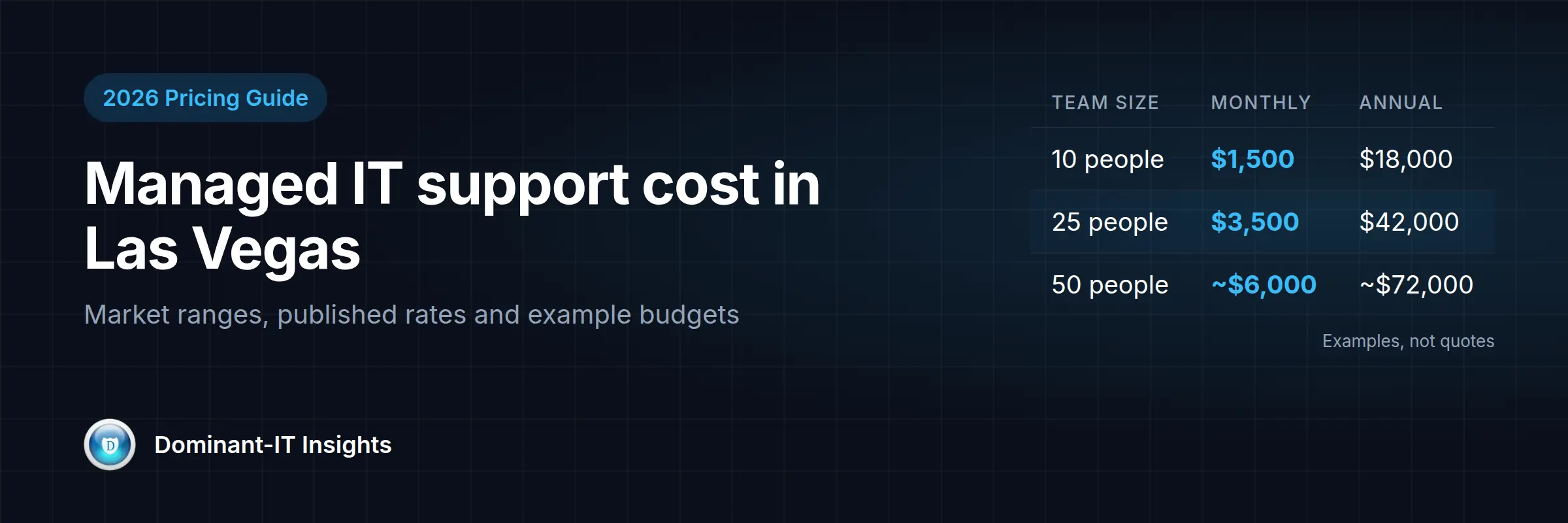
The examples below use our published per-user rates to show what a year of managed IT might look like. These are examples, not quotes. Your actual price depends on your environment and scope.
| Business size | Example monthly cost | Example annual cost | Rate used |
|---|---|---|---|
| 10-person office | $1,500 | $18,000 | $150/user |
| 25-person company | $3,500 | $42,000 | $140/user (see note) |
| 50-person company | About $6,000 | About $72,000 | $120/user starting rate (negotiated) |
The 25-person example uses the 20-user rate. Pricing for 40 or more users is negotiated, so the 50-person figure shows the $120 starting rate. These figures cover the managed IT service itself. Budget separately for software licenses, hardware refreshes and any one-time projects.
Managed IT vs. break-fix IT support
Break-fix means you call someone when something breaks and pay by the hour. It can look cheaper, and for a very small office with simple needs it sometimes is.
The trade-offs:
| Managed IT | Break-fix | |
|---|---|---|
| Cost pattern | Predictable monthly fee | Unpredictable; spikes when things fail |
| Approach | Preventive: monitoring, patching, maintenance | Reactive: fix after failure |
| Security | Ongoing monitoring and updates | Usually none between visits |
| Provider incentive | Fewer problems means less work for the provider | More problems means more billable hours |
| Documentation | Maintained as part of the service | Often missing |
The last row matters more than it looks. Under a flat fee, the provider is paid the same whether your systems are stable or not, so prevention is in their interest. Under break-fix, it isn't.
Managed IT vs. hiring internal IT staff
A full-time IT employee brings salary, benefits, payroll taxes, training and tools, and still covers only one person's hours and skills. One person rarely covers help desk, networking, servers, security monitoring and compliance equally well, and nobody covers the gaps when they are sick or on vacation.
For many small businesses, a managed service provider costs less than one full-time hire and covers a wider range of skills. For larger organizations, the choice is not either-or.
Co-managed IT
Co-managed IT pairs your internal IT staff with an outside provider. Your team handles day-to-day, on-site needs and institutional knowledge; the provider adds 24/7 monitoring, security operations, specialized skills and extra hands for projects. It is a practical way to strengthen an existing team without hiring for every specialty. Dominant-IT offers co-managed IT for businesses that already have internal IT staff.
Questions to ask a Las Vegas MSP before you sign
- Is pricing per user, per device, or both? What counts as a user?
- Exactly what is included in the monthly fee, and what is billed separately?
- What are your response times for critical and non-critical issues, and are they in writing?
- What happens after hours and on weekends?
- Is on-site support included, or billed separately?
- What security services are included? Who watches the alerts, and when?
- How are backups handled, how often are restores tested, and who pays for storage?
- What is the contract length, and what does it cost to leave?
- Is there an onboarding fee, and what does onboarding include?
- Which compliance frameworks do you work with, and what documentation will you provide?
- What certifications does your team hold?
- Will we get documentation of our environment, including passwords and network diagrams, if we leave?
For reference, our team holds Certified Information Systems Security Professional, Microsoft Certified Systems Engineer, Microsoft Certified IT Professional: Enterprise Administrator, Azure Security Engineer Associate, Red Hat Certified System Administrator and CompTIA A+ certifications, has completed SANS FOR500 (digital forensics and incident response) and SEC411, and is currently completing SANS SEC530.
Red flags when comparing providers
- No written scope. If a proposal doesn't list what's included, assume you'll be billed for everything that isn't.
- Pricing that is only available after several sales calls. You should be able to get a clear number quickly.
- Vague security claims. "We handle security" is not an answer. Ask what is monitored, by whom and when.
- Long contracts with steep exit fees and no performance terms.
- No documentation handover. Your network map, admin credentials and configurations belong to you.
- "Unlimited support" with no response times defined.
- Compliance promises. A provider can help you prepare for HIPAA, PCI DSS or SOC 2, but no provider can guarantee you pass an audit.
Managed IT provider comparison checklist
Use this table to put quotes side by side. Fill in one column per provider.
| Item | Provider A | Provider B | Provider C |
|---|---|---|---|
| Price per user per month | |||
| Devices included (workstations, servers, network) | |||
| Critical issue response time (in writing) | |||
| 24/7 monitoring included | |||
| Security monitoring / SOC included | |||
| After-hours support included | |||
| On-site support included | |||
| Backup included, restores tested | |||
| Licensing included or separate | |||
| Onboarding fee | |||
| Contract length and exit terms | |||
| Compliance frameworks supported | |||
| Team certifications | |||
| Documentation handed over on exit |
Frequently asked questions
How much do managed IT services cost in Las Vegas?
Market pricing commonly falls between about $75 and $250 or more per user per month, depending on scope. Basic help desk plans sit at the low end; security- and compliance-focused plans sit at the high end. Dominant-IT's published pricing runs from $150 per user per month for 10 users down to $120 per user for 40 or more.
Is managed IT priced per user or per device?
Most providers price per user. Some price per device or use a mix. Dominant-IT prices per user and includes unlimited workstations, servers and network devices.
Is managed IT cheaper than hiring an IT employee?
For many small businesses, yes, because one employee's salary and benefits usually exceed a managed IT fee, and a provider covers more skill areas. Larger organizations often combine both through co-managed IT, which Dominant-IT offers.
What is the difference between managed IT and break-fix?
Managed IT is a flat monthly fee for ongoing monitoring, maintenance and support. Break-fix is hourly billing when something breaks. Managed IT is more predictable and preventive; break-fix can cost less in a quiet year and much more in a bad one.
What should be included in a managed IT contract?
A written scope of services, response times, support hours, security services, backup responsibilities, exclusions, contract length, exit terms and documentation handover.
Do you need a local Las Vegas IT company?
Most support is delivered remotely today, so location matters less than it once did. A local provider can still help when hardware or on-site work is needed. Dominant-IT is based in Las Vegas and provides remote support anywhere.
Does managed IT include cybersecurity?
It depends on the provider and plan. Many basic plans include only antivirus and patching. Dominant-IT's managed IT includes 24/7 monitoring; dedicated security work such as cybersecurity consulting and penetration testing is quoted separately.
Conclusion: get a clear number before you commit
Managed IT pricing in Las Vegas varies widely, and the monthly number only means something alongside a written scope. Compare providers on what's included, how quickly they respond, how they handle security, and what it costs to leave. A clear, published price is a good sign; a vague one is worth questioning.
Dominant-IT publishes its pricing, works with healthcare, construction, finance and insurance businesses, and has supported Las Vegas companies since 2011.
Want a number for your business? Tell us how many employees, locations, and computers you have, and we'll send you a straightforward estimate. Contact us, call (702) 514-0583, or email contact@dominant-it.com.
Sources and further reading
- Federal Trade Commission: Cybersecurity for Small Business
- Cybersecurity and Infrastructure Security Agency (CISA): Cyber Essentials
- U.S. Department of Health and Human Services: HIPAA Security Rule